Table of Contents
Introduction
It can take so much longer than you think to make children’s learning books.
The author may need to create a character, figure out what words or objects go with each letter, make the illustrations, keep the character the same throughout the book, write the title and description, research keywords, choose categories, and then prepare the files to publish.
There’s another issue that can arise with AI image generators: character consistency.
A character may look slightly different from one page to another, making the finished book feel less polished.
ABC Story Creator aims to tackle some of these problems through the use of an AI chatbot and structured prompts.
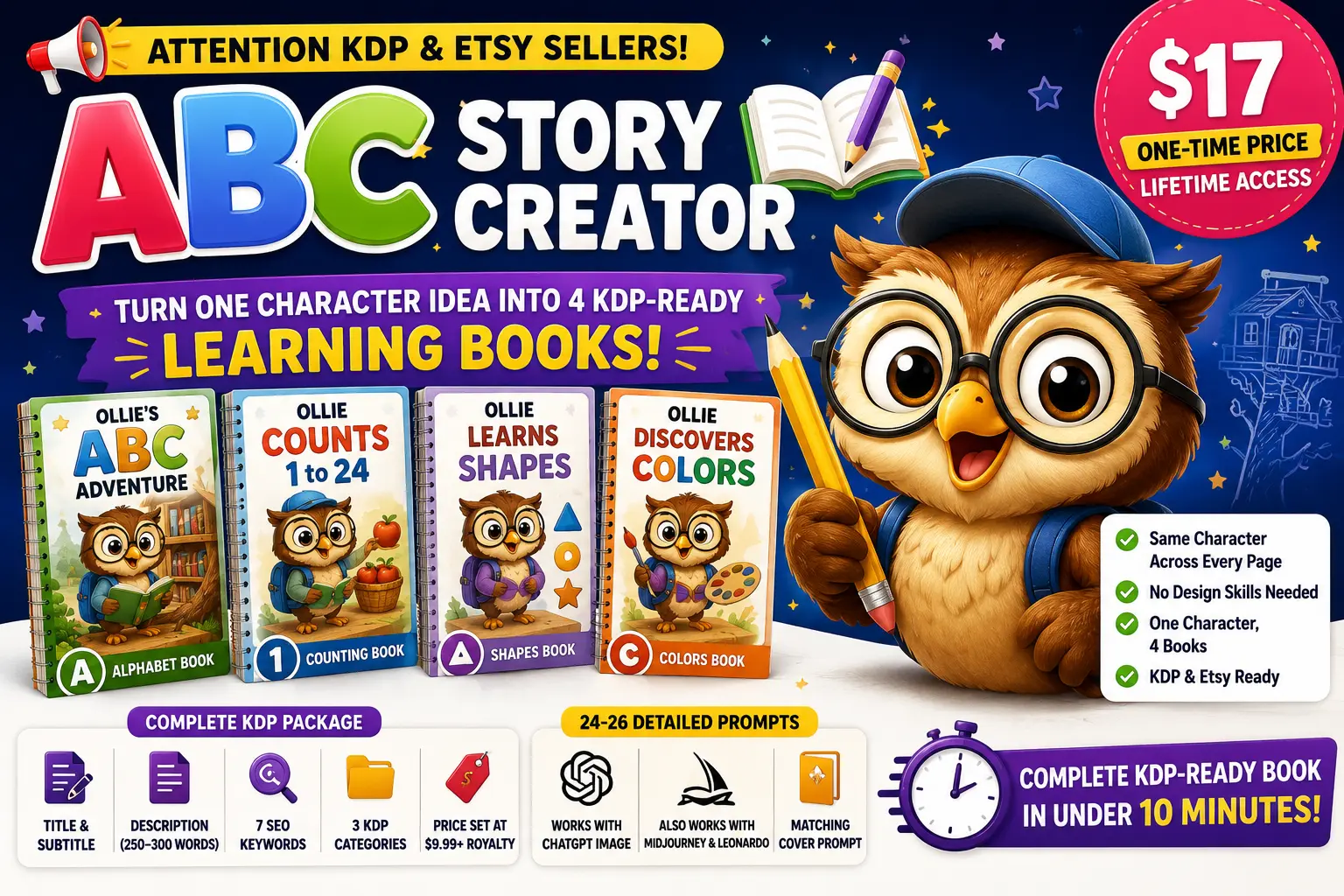
According to the official product page, users can describe one character in a few sentences and then use that character to create ABC, alphabet, counting, shape, or color books. The system also generates publishing information such as a title, description, keywords, categories, and suggested price.
The product is primarily targeted towards KDP and Etsy sellers, educational-resource creators, beginners, and people who are interested in children’s learning books.
In this ABC Story Creator Review 2026, we will tell you what the tool does, its main features, bonuses, pricing, benefits, limitations, and who it might be for.
Product Details
| Product Name | ABC Story Creator |
| Vendor | luckysmith89 |
| Main Users | KDP & Etsy Sellers, Teachers, Creators |
| Official Website | www.abcstorycreator.com |
| Bonuses | CLICK HERE |
| Pricing | $17 |
| OTO’s | Yes |

What Is ABC Story Creator?
ABC Story Creator is an AI-assisted chatbot and prompt-generation system designed for creating children’s educational books.
Users no longer have to write dozens of image prompts manually. Instead, the system starts with a character description.
A creator might describe a character as
Ollie is a curious little owl that lives in a treehouse library and loves to collect acorns and look at the stars.
Then the system uses the character information to construct the book structure and prompts around that character.
The product supports four main book concepts:
- 🔤 ABC Alphabet
- 🔢 Counting
- 🔺 Shapes
- 🎨 Colors
It also offers different audience styles, including toddler, preschool, early elementary, and homeschool editions.
The important idea is that one character can be reused across multiple book types, allowing creators to build a related series rather than starting with a completely new character every time.
🚀 Key Features of ABC Story Creator
🔤 Four Different Book Types
The same basic character idea can be used for four different educational concepts:
ABC Alphabet Book
Create an alphabet-focused book with pages covering letters from A to Z.
Counting Book
Create a counting resource covering numbers from 1 to 24.
Shapes Book
Create a learning book focused on 12 different shapes.
Colors Book
Create a resource covering 12 colors.
The product page says each book type has its own content structure and can be used as part of a broader children’s learning series.
👶 Multiple Audience Styles
ABC Story Creator allows creators to choose between four audience styles:
- Toddler
- Preschool
- Early Elementary
- Homeschool Edition
The product information says the chatbot adjusts the art style and text based on the selected audience. The Homeschool Edition also adds tracing lines for handwriting practice.
This can make the same general concept more adaptable to different learner groups.
📋 KDP Publishing Package
Another useful part of the system is the built-in publishing package.
According to the sales page, users receive:
- Title
- Subtitle
- 250–300 word description
- 7 SEO keywords
- 3 categories
- Suggested price
This can be helpful for beginners who are unfamiliar with the different elements needed when preparing a KDP listing.
However, users should still review the generated metadata before publishing because marketplace categories, keywords, and policies can change.
🎨 Detailed Image Prompts
The chatbot generates 24–26 detailed prompts depending on the book type.
These prompts are designed to be copied into an AI image generator.
The sales page says the prompts are optimized for ChatGPT Image, while also working with tools such as Midjourney and Leonardo with possible adjustments.
This means ABC Story Creator is not itself an image-generation platform. Instead, it helps prepare the prompts that can then be used with an AI image tool.
🌈 Matching Cover Prompt
A separate cover prompt is included to help create a full-color cover that matches the interior character.
The product page says users can choose the cover layout and title position.
Having a matching cover can be useful because the cover and interior pages can have a more consistent visual identity.
🔄 One Character Can Become a Series
One of the more interesting aspects of the product is its series-building approach.
A creator could potentially use one character for the following:
ABC Book → Counting Book → Shapes Book → Colors Book
The character anchor is reused across the different book types.
This can be useful for creators who want to build a recognizable children’s book series instead of publishing unrelated standalone books.
⚙️ How Does ABC Story Creator Work?
The basic workflow is fairly straightforward.
Step 1: Describe Your Character
Start with a short character description.
The product recommends providing around 2–4 sentences describing the character and its world, including elements such as setting, interests, and mood.
You can create your own character or use one of the ready-made ideas included in Bonus #1.
Step 2: Select the Book Type
Choose what you want to create:
- ABC
- Counting
- Shapes
- Colors
Each option generates a different content structure.
Step 3: Select Your Audience
Choose the intended audience:
- Toddler
- Preschool
- Early Elementary
- Homeschool
The selected audience affects the style and structure of the generated content.
Step 4: Generate the Package
The chatbot generates the publishing information, character anchor, concept sequence, and image prompts.
The sales page says users can receive the core package in around 10 minutes, although the entire book creation process takes longer because images still need to be generated and assembled.
Step 5: Generate the Images
Copy the prompts into your preferred AI image generator.
The product recommends ChatGPT Image, while also mentioning Midjourney and Leonardo as alternatives
Step 6: Assemble the Book
After generating the images, the pages can be arranged and formatted for publication.
The included publishing guide provides instructions for preparing the files and uploading them to KDP.
Step 7: Review Before Publishing
This step should not be skipped.
Check:
- Character consistency
- Spelling
- Letter/word accuracy
- Image quality
- Page dimensions
- Text placement
- Copyright and licensing
- KDP requirements
The vendor itself acknowledges that AI-generated text can occasionally require regeneration or correction.
🎁 What Bonuses Are Included?
The offer includes four additional resources.
Bonus #1: 250 Learning Companion Ideas
This bonus provides 250 ready-made character ideas.
According to the sales page, the ideas are divided across the four audience tiers:
- 63 Toddler characters
- 63 Preschool characters
- 62 Early Elementary characters
- 62 Homeschool characters
The list is also color-coded and filterable.
Bonus #2: From Prompts to Published
This is a step-by-step guide designed to help beginners move from generated images to a published KDP book.
It covers areas such as the following:
- Preparing files
- Building pages in Canva
- Creating the cover
- Uploading to KDP
- AI-content disclosure
- Common problems
- Final checklist
Bonus #3: 100 Title Templates
This bonus includes 100 KDP title templates organized around different book types and angles.
The templates cover character, educational, homeschool, and gift-oriented approaches.
This can be useful for beginners who struggle with coming up with suitable book titles.
Bonus #4: ABC Niche Research 2026
The final bonus focuses on niche research.
According to the sales page, it covers 10 ABC, counting, shapes, and colors niches and includes competition and demand notes, suggested price ranges, SEO keywords, and a method for independently checking the research.
This should be treated as a research starting point rather than a guarantee that a particular niche will be profitable.
👥 Who Is ABC Story Creator Best For?
📚 KDP Publishers
KDP sellers who create children’s educational books may find the structured prompts and metadata package useful.
🛍️ Etsy Sellers
Etsy sellers who create printables, homeschool resources, or educational products can potentially use the system to develop new product ideas.
🏡 Homeschool Resource Creators
The Homeschool Edition makes the tool relevant to creators producing educational materials for home learning.
🧑💻 Beginners
The included publishing guide is specifically designed to help beginners move from generated images to a KDP listing.
⚡ Experienced KDP Sellers
Experienced sellers may be more interested in the speed and ability to reuse a character across several related book concepts.
💰 ABC Story Creator Pricing & What You Get
The current sales page advertises ABC Story Creator with lifetime access for a one-time $17 payment. It also lists the four bonuses as part of the offer.
The package includes:
- ABC Story Creator
- 250 Learning Companion Ideas
- From Prompts to Published
- 100 Title Templates
- ABC Niche Research 2026
The sales page lists a 30-day money-back guarantee.
✅ ABC Story Creator Pros & Cons
👍 Pros
- 🔤 Supports four children’s learning book types
- 🧬 Character Anchor system for prompt consistency
- 👶 Four audience styles
- 🎨 Matching cover prompt
- 📋 KDP metadata included
- 📝 24–26 detailed prompts
- 🔄 One character can be reused for multiple book types
- 📚 Includes a beginner-friendly publishing guide
- 💡 250 ready-made character ideas
- 🏷️ 100 title templates
- 🔍 Includes niche research material
- 🛍️ Suitable for KDP and Etsy creators
- 💵 One-time front-end purchase
- 🔓 Lifetime access according to the offer
👎 Cons
- 🤖 Actual images still depend on an external AI image generator
- ✏️ Generated pages need proofreading and quality checking
- 🔍 KDP keywords and categories should be independently reviewed
- 💻 Regular image generation may require a paid AI service depending on usage
- 📈 No guaranteed sales or income
- 🎯 The system is mainly focused on ABC, Counting, Shapes, and Colors books
- 🧒 It is primarily designed for children’s educational content
- 🛠️ Some manual work remains after the prompts are generated
❓ ABC Story Creator FAQs
1. What is ABC Story Creator?
ABC Story Creator is an AI-assisted chatbot and prompt system designed to help create ABC, Counting, Shapes, and Colors learning books for children.
2. How does ABC Story Creator work?
You provide a short character description and select a book type and audience, and the chatbot generates a character anchor, content sequence, image prompts, and KDP publishing information.
3. What types of books can I create?
The system supports four main types:
ABC Alphabet
Counting
Shapes
Colors
4. Can I use one character for multiple books?
Yes. The product is specifically designed so the same character can be reused across the four different book types.
5. Does ABC Story Creator generate the actual images?
No. The system primarily generates the structured prompts and publishing package. You then use an AI image generator to create the illustrations.
6. Can beginners use ABC Story Creator?
Yes. The product is designed with beginners in mind and includes a publishing guide explaining the process from generated images to KDP.
7. Do I need ChatGPT Plus?
Not necessarily. The vendor says free ChatGPT accounts can generate images with some limitations, while Plus is recommended for regular book creation.
⭐ The Conclusion
ABC Story Creator is an interesting option for people who want to create children’s learning books with AI without manually writing every image prompt from scratch.
Its most useful feature is arguably the combination of the character anchor, multiple book types, and audience styles.
Instead of creating a completely new concept for every book, a creator can start with one character and potentially develop an ABC book, counting book, shapes book, and colors book around that character.
The built-in KDP metadata package is another practical feature, particularly for beginners who are unfamiliar with titles, descriptions, keywords, and categories.
⭐ My Rating: 4.4/5
Best For:
- KDP children’s book creators
- Etsy educational-resource sellers
- Homeschool resource creators
- Beginner publishers
- AI-assisted book creators
- Experienced KDP sellers looking to speed up production